

Introduction:
In this experiment, we explore the use of the MPR121 capacitive touch sensor controller with the Raspberry Pi Pico to detect touch inputs. The MPR121 is an I2C-based controller that can detect up to 12 individual touch points, making it ideal for building touch-sensitive interfaces like touchpads or capacitive buttons. This experiment involves connecting the MPR121 to the Pico, reading the electrode values, and displaying touch detection results.
Scope:
The experiment aims to:
Interface the MPR121 touch sensor with the Raspberry Pi Pico using I2C communication.
Read and display touch inputs from the sensor.
Implement the application in both Embedded C and MicroPython.
Provide practical use cases such as touch-sensitive buttons or touch-controlled devices.
Prerequisite:
3.1. Hardware:
Pico microcontroller
MPR121
Breadboard
Jumper wires
USB cable (to connect the computer)
3 .2. Software:
Thonny Software(For micro python)
MicroPython firmware installed on Raspberry Pi Pico
ubuntu Terminal(For embedded C)
CMake,Pico SDK,GNU Arm Embedded Toolchain,WSL.
Connection Details:
MPR121 to Pico I2C connections:
MPR121 SDA (Data Line) → Pico GP4 (I2C SDA).
MPR121 SCL (Clock Line) → Pico GP5 (I2C SCL).
MPR121 VCC → Pico 3.3V.
MPR121 GND → Pico GND.

Working Principle:
The MPR121 capacitive touch sensor works by measuring the capacitance of each electrode. When an object (such as a human finger) comes close to the electrode, it changes the capacitance, which the MPR121 detects. The MPR121 sends touch status information to the Raspberry Pi Pico via I2C communication. The Pico reads these status values and identifies which electrodes are being touched. Based on the touch threshold and release threshold set in the MPR121, touch events are detected and reported to the console.
MPR121
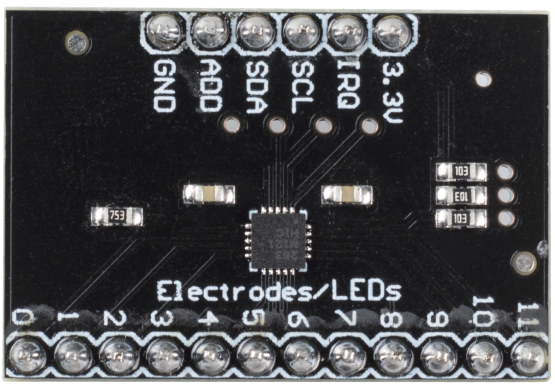
3.3V: Power supply
IRQ: Open Collector Interrupt Output Pin, active low
SCL: I2C Clock
SDA: I2C Data
ADD: I2C Address Select Input Pin. Connect the ADDR pin to the VSS, VDD, SDA or SCL line, the resulting I2C addresses are 0x5A, 0x5B, 0x5C and 0x5D respectively
GND: Ground
0~11: Electrode 0~11, electrode is a touch sensor. Typically, electrodes can just be some piece of metal, or a wire. But some times depending on the length of our wire, or the material the electrode is on, it can make triggering the sensor difficult. For this reason, the MPR121 allows you to configure what is needed to trigger and untrigger an electrode.
MPR121 OVERVIEW
The MPR121 is the second generation capacitive touch sensor controller after the initial release of the MPR03x series devices. The MPR121 features increased internal intelligence, some of the major additions include an increased electrode count, a hardware configurable I2C address, an expanded filtering system with debounce, and completely independent electrodes with auto-configuration built in. The device also features a 13th simulated sensing channel dedicated for near proximity detection using the multiplexed sensing inputs.
Application code:
MicroPython:
from machine import I2C, Pin
import time
MPR121_I2C_ADDR = 0x5A
# Initialize I2C
i2c = I2C(0, sda=Pin(6), scl=Pin(7), freq=100000)
def mpr121_init():
# Set threshold registers for touch/release detection
for i in range(12):
i2c.writeto_mem(MPR121_I2C_ADDR, 0x41 + (i * 2), bytearray([0x0F])) # Touch threshold
i2c.writeto_mem(MPR121_I2C_ADDR, 0x42 + (i * 2), bytearray([0x0A])) # Release threshold
i2c.writeto_mem(MPR121_I2C_ADDR, 0x5E, bytearray([0x8F])) # Enable electrodes
def read_touch_status():
touch_bytes = i2c.readfrom_mem(MPR121_I2C_ADDR, 0x00, 2)
touch_status = int.from_bytes(touch_bytes, 'little')
return touch_status
# Initialize MPR121
mpr121_init()
while True:
status = read_touch_status()
for i in range(12):
if status & (1 << i):
print(f"Electrode {i} touched")
time.sleep(0.5)
Embedded C:
from machine import I2C, Pin
import time
MPR121_I2C_ADDR = 0x5A
# Initialize I2C
i2c = I2C(0, sda=Pin(6), scl=Pin(7), freq=100000)
def mpr121_init():
# Set threshold registers for touch/release detection
for i in range(12):
i2c.writeto_mem(MPR121_I2C_ADDR, 0x41 + (i * 2), bytearray([0x0F])) # Touch threshold
i2c.writeto_mem(MPR121_I2C_ADDR, 0x42 + (i * 2), bytearray([0x0A])) # Release threshold
i2c.writeto_mem(MPR121_I2C_ADDR, 0x5E, bytearray([0x8F])) # Enable electrodes
def read_touch_status():
touch_bytes = i2c.readfrom_mem(MPR121_I2C_ADDR, 0x00, 2)
touch_status = int.from_bytes(touch_bytes, 'little')
return touch_status
# Initialize MPR121
mpr121_init()
while True:
status = read_touch_status()
for i in range(12):
if status & (1 << i):
print(f"Electrode {i} touched")
time.sleep(0.5)
Hardware Image:

Output:
The program will output which electrodes are touched, displayed in the console

Video Demonstration:
Appendix:
Common CMakeLists:
cmake_minimum_required(VERSION 3.12)
# Pull in SDK (must be before project)
include(pico_sdk_import.cmake)
project(pico_experiments C CXX ASM)
set(CMAKE_C_STANDARD 11)
set(CMAKE_CXX_STANDARD 17)
if (PICO_SDK_VERSION_STRING VERSION_LESS "1.3.0")
message(FATAL_ERROR "Raspberry Pi Pico SDK version 1.3.0 (or later) required. Your version is ${PICO_SDK_VERSION_STRING}")
endif()
# Initialize the SDK
pico_sdk_init()
add_compile_options(-Wall
-Wno-format # int != int32_t as far as the compiler is concerned because gcc has int32_t as long int
-Wno-unused-function # we have some for the docs that arent called
)
if (CMAKE_C_COMPILER_ID STREQUAL "GNU")
add_compile_options(-Wno-maybe-uninitialized)
endif()
# Hardware-specific examples in subdirectories:
add_subdirectory(expt_10_LCD)
CMakeLists:
cmake_minimum_required(VERSION 3.13)
include(pico_sdk_import.cmake)
project(mpr121_touch)
pico_sdk_init()
add_executable(mpr121_touch main.c)
target_link_libraries(mpr121_touch pico_stdlib hardware_i2c)
pico_add_extra_outputs(mpr121_touch)
References:
These references provide comprehensive.
| # | Topic | Date & time | Action |
|---|
0% Completed (0/1)