

Introduction:
The aim of this experiment is to rotate a DC motor in both clockwise and anticlockwise directions using the Raspberry Pi Pico and an L293D motor driver. The L293D motor driver allows bidirectional control of the motor, while the Raspberry Pi Pico sends control signals to the motor driver to control the motor’s direction.
Scope:
This experiment demonstrates how to interface a DC motor with the Raspberry Pi Pico using an L293D motor driver. The experiment's scope includes:
Understanding how to control motor direction.
Learning to use the L293D H-Bridge motor driver.
Writing control logic in both MicroPython and Embedded C.
Building a functional motor control system for various applications such as robotics or irrigation systems.
Prerequisite:
3.1. Hardware:
Pico microcontroller
LED
Breadboard
DC motor
L293D Motor Drive
Power supply break board
Jumper wires
USB cable (to connect the computer)
3 .2. Software:
Thonny Software(For micro python)
MicroPython firmware installed on Raspberry Pi Pico
ubuntu Terminal(For embedded C)
CMake,Pico SDK,GNU Arm Embedded Toolchain,WSL.
Connection Details:
Raspberry Pi Pico to L293D:
GPIO 14 (Pin 19) → IN1 (Pin 2) on L293D.
GPIO 15 (Pin 20) → IN2 (Pin 7) on L293D.
GPIO 13 (Pin 17) → Enable Pin (Pin 1) on L293D.
5V from Pico → VCC1 (Pin 16) on L293D.
GND from Pico → GND (Pin 4, Pin 5) on L293D.
L293D to DC Motor:
Pin 3 (Out1) on L293D → Terminal 1 of DC motor.
Pin 6 (Out2) on L293D → Terminal 2 of DC motor.
Power Supply to L293D:
VCC2 (Pin 8) of L293D → 5V or 12V depending on the motor’s power requirement.
GND to common ground with the Raspberry Pi Pico.


Working Principle:
The goal of this experiment is to control a DC motor using the Raspberry Pi Pico and the L293D motor driver to rotate the motor in both clockwise and anticlockwise directions. The L293D acts as an intermediary between the microcontroller and the motor, allowing the motor to receive the correct signals for direction control.
1. Raspberry Pi Pico
The Raspberry Pi Pico is a microcontroller that sends control signals to the L293D motor driver through its GPIO pins. In this experiment, two GPIO pins (GPIO 14 and GPIO 15) are used to control the motor direction. Another GPIO pin (GPIO 13) is used to enable the motor driver.
2. L293D Motor Driver
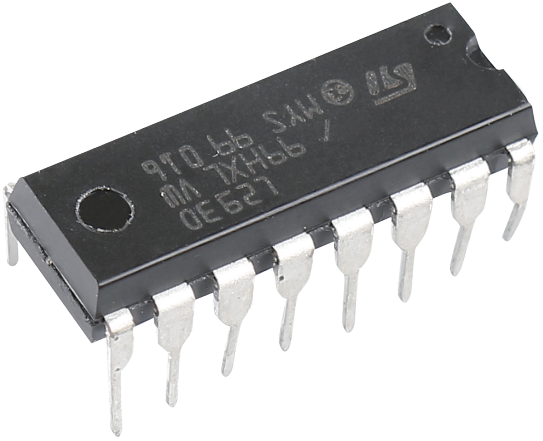
L293D is a 4-channel motor driver integrated by chip with high voltage and high current. It’s designed to connect to standard DTL, TTL logic level, and drive inductive loads (such as relay coils, DC, Stepper Motors) and power switching transistors etc. DC Motors are devices that turn DC electrical energy into mechanical energy. They are widely used in electrical drive for their superior speed regulation performance.
See the figure of pins below. L293D has two pins (Vcc1 and Vcc2) for power supply. Vcc2 is used to supply power for the motor, while Vcc1 to supply for the chip. Since a small-sized DC motor is used here, connect both pins to +5V.

The following is the internal structure of L293D. Pin EN is an enable pin and only works with high level; A stands for input and Y for output. You can see the relationship among them at the right bottom. When pin EN is High level, if A is High, Y outputs high level; if A is Low, Y outputs Low level. When pin EN is Low level, the L293D does not work.

3.DC Motor
This is a 3V DC motor. When you give a high level and a low level to each of the 2 terminals, it will rotate.
Size: 25*20*15MM
Operation Voltage: 1-6V
Free-run Current (3V): 70m
A Free-run Speed (3V): 13000RPM
Stall Current (3V): 800mA
Shaft Diameter: 2mm
Direct current (DC) motor is a continuous actuator that converts electrical energy into mechanical energy. DC motors make rotary pumps, fans, compressors, impellers, and other devices work by producing continuous angular rotation.
A DC motor consists of two parts, the fixed part of the motor called the stator and the internal part of the motor called the rotor (or armature of a DC motor) that rotates to produce motion. The key to generating motion is to position the armature within the magnetic field of the permanent magnet (whose field extends from the north pole to the south pole). The interaction of the magnetic field and the moving charged particles (the current-carrying wire generates the magnetic field) produces the torque that rotates the armature.

4.Power Supply Module
A 3.3V and 5V breadboard power module with series diode and reverse polarity protection. The module can accept 6.5V to 12V input, and can generate 3.3V and +5V. For experimenters who must test/prototype electronic circuits on breadboards or perforated/veroboards, this is a must-have power supply module.

Application code:
MicroPython:
import machine
import utime
# Define motor control pins
motor1A = machine.Pin(14, machine.Pin.OUT)
motor2A = machine.Pin(15, machine.Pin.OUT)
# Function to rotate motor clockwise
def clockwise():
motor1A.high()
motor2A.low()
# Function to rotate motor anticlockwise
def anticlockwise():
motor1A.low()
motor2A.high()
# Function to stop motor
def stopMotor():
motor1A.low()
motor2A.low()
while True:
clockwise()
utime.sleep(10)
stopMotor()
utime.sleep(10)
anticlockwise()
utime.sleep(10)
stopMotor()
utime.sleep(10)
Embedded C:
#include "pico/stdlib.h"
#define MOTOR1A 14
#define MOTOR2A 15
void clockwise() {
gpio_put(MOTOR1A, 1);
gpio_put(MOTOR2A, 0);
}
void anticlockwise() {
gpio_put(MOTOR1A, 0);
gpio_put(MOTOR2A, 1);
}
void stopMotor() {
gpio_put(MOTOR1A, 0);
gpio_put(MOTOR2A, 0);
}
int main() {
gpio_init(MOTOR1A);
gpio_set_dir(MOTOR1A, GPIO_OUT);
gpio_init(MOTOR2A);
gpio_set_dir(MOTOR2A, GPIO_OUT);
while (true) {
clockwise();
sleep_ms(10000); // Rotate clockwise for 10 seconds
stopMotor();
sleep_ms(10000); // Stop for 10 seconds
anticlockwise();
sleep_ms(10000); // Rotate anticlockwise for 10 seconds
stopMotor();
sleep_ms(10000); // Stop for 10 seconds
}
return 0;
}
Hardware Image:


Output:
The motor will rotate in the clockwise direction for 10 seconds, stop for 10 seconds, then rotate in the anticlockwise direction for another 10 seconds, and stop again.
Video Demonstration:
Appendix:
Common CMakeLists:
cmake_minimum_required(VERSION 3.12)
# Pull in SDK (must be before project)
include(pico_sdk_import.cmake)
project(pico_experiments C CXX ASM)
set(CMAKE_C_STANDARD 11)
set(CMAKE_CXX_STANDARD 17)
if (PICO_SDK_VERSION_STRING VERSION_LESS "1.3.0")
message(FATAL_ERROR "Raspberry Pi Pico SDK version 1.3.0 (or later) required. Your version is ${PICO_SDK_VERSION_STRING}")
endif()
# Initialize the SDK
pico_sdk_init()
add_compile_options(-Wall
-Wno-format # int != int32_t as far as the compiler is concerned because gcc has int32_t as long int
-Wno-unused-function # we have some for the docs that arent called
)
if (CMAKE_C_COMPILER_ID STREQUAL "GNU")
add_compile_options(-Wno-maybe-uninitialized)
endif()
# Hardware-specific examples in subdirectories:
add_subdirectory(expt_10_LCD)
CMakeLists:
cmake_minimum_required(VERSION 3.13)
# Initialize Pico SDK
include(pico_sdk_import.cmake)
project(MotorControl)
# Initialize the Raspberry Pi Pico SDK
pico_sdk_init()
# Add executable
add_executable(MotorControl main.c)
# Link with pico_stdlib library
target_link_libraries(MotorControl pico_stdlib)
# Enable USB output and UART output
pico_enable_stdio_usb(MotorControl 1)
pico_enable_stdio_uart(MotorControl 0)
# Create binary for flashing
pico_add_extra_outputs(MotorControl)
References:
| # | Topic | Date & time | Action |
|---|
0% Completed (0/1)